Make Faceless POV Videos That Put Viewers Inside the Scene
POV videos make viewers feel like they are inside the story. Learn five faceless POV formats, how to script them, and how to make and schedule them with AI, with no camera and no face on screen.
Roberto Pasqualini
CMO at Faceless Lab
How to make faceless POV videos with AI: five formats that need no camera, a script formula, a step by step workflow and a posting plan you can schedule in one sitting.
Can you make a POV video without ever appearing on camera? Yes, and it is one of the easiest short-form formats to start with. A POV video tells the viewer what is happening to them ("POV: you wake up and it is the first day of winter break"), so the camera never needs a face. If you have wondered how to make faceless POV videos that people actually finish, this guide shows the formats, the script structure and the exact workflow we use inside Faceless Lab.
Executive Summary
A faceless POV video is a short vertical video written in second person, where the narrator and the visuals put the viewer inside a situation, with no presenter on camera. The format works because it opens a story in the first second, asks for no explanation and fits every platform that rewards completion rate. The simplest way to make one is to write a one-line "POV:" hook, choose a story structure, add an AI voice and consistent AI visuals, and let captions carry the pacing. With Faceless Lab you type the idea, pick a structure, voice and visual style, review the draft and schedule the finished videos, so a week of POV content can be made in one afternoon.
Table of Contents
- What a faceless POV video is and why it works
- Five POV formats that need no camera
- Write a POV script that puts the viewer in the scene
- How to make a faceless POV video inside Faceless Lab
- Keep your POV visuals and voice consistent
- Where Faceless Lab is and is not the right choice
- What to post once the POV trend cools
1. What a faceless POV video is and why it works
POV stands for point of view. In short-form video it means the viewer is the main character. The text on screen or the narration starts with "POV:" and describes a moment, and everything that follows is shown from the viewer's eyes. There is no host to introduce, so the first frame already holds the story.
That is why the format suits a channel without a face. The "camera" is the viewer, so a missing presenter feels natural. We use it ourselves when we want a story to land in under thirty seconds.
Why viewers stay for POV videos
- The hook is built in. A line like "POV: your alarm rings and the whole street is covered in snow" gives context, emotion and a question in one sentence.
- It invites a reaction. Second person makes people comment with their own version, which helps with the engagement signals platforms watch.
- It is cheap to repeat. One situation can become ten videos by changing the setting, the character or the ending.
- It travels across platforms. The same vertical video fits YouTube Shorts, Instagram Reels, Facebook, TikTok and LinkedIn.
2. Five POV formats that need no camera
You do not need footage of real people for any of these. Original AI visuals and a voiceover are enough.
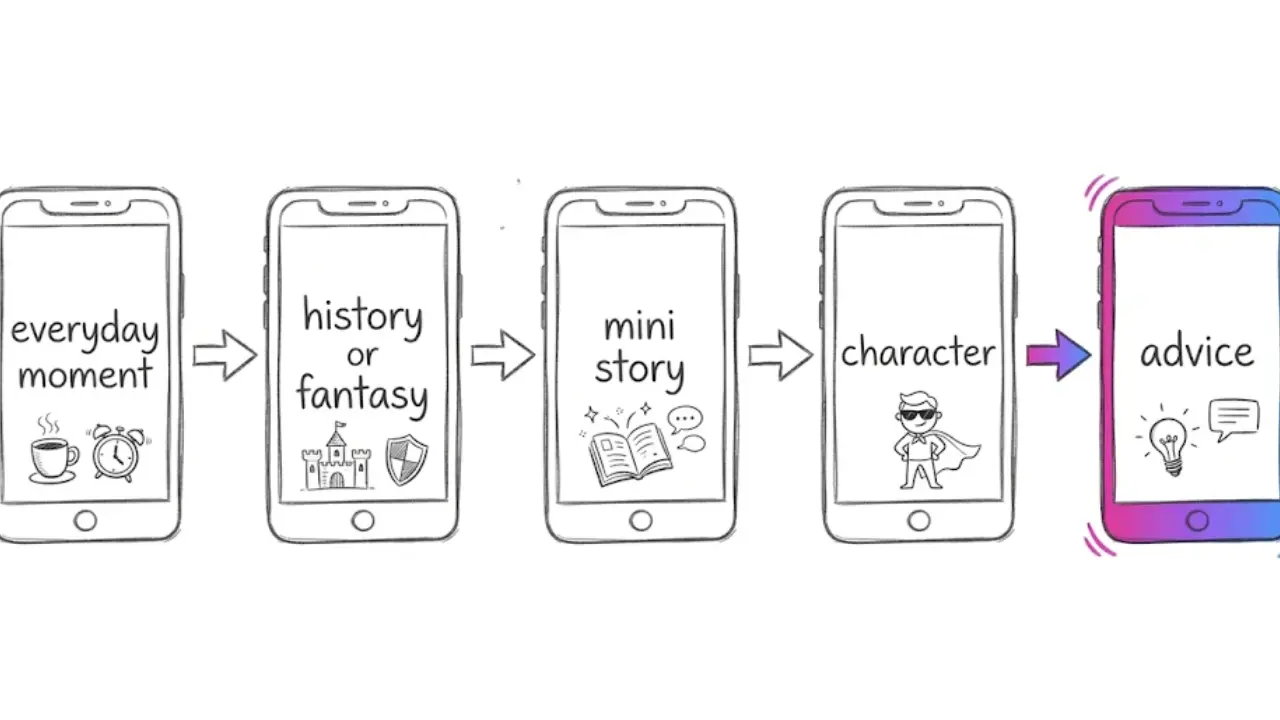
Everyday moment POV
A small relatable situation told in the first person, such as the first morning of a new job or the last day of a trip. These are easy to write and easy for viewers to place themselves in.
Historical or fantasy POV
"POV: you are a messenger in an ancient city the night before a festival." Here the visuals do the heavy lifting, and AI-generated scenes can show places no camera could reach. This pairs well with a faceless history or mythology channel.
Second-person mini story
A three-beat story (a setup, a surprise, an ending) told as "you". This is the closest to classic storytelling and works well as a series. Our post on faceless storytelling videos covers the pacing.
Character POV
One recurring character speaks to the viewer ("POV: your cat explains why the couch is hers now"). Recurring characters make a channel recognizable, and we cover how to keep one stable in our guide to keeping the same character in every faceless video.
Advice POV
Practical tips framed as a scene: "POV: you finally have a plan for your first week at the gym." Useful for fitness, study, money and productivity niches.
💡 Picking the format is easier once you know your niche. If you are not sure yet, The Faceless Niche Method is our guide to choosing a niche, with a Niche Scorecard and a 30-day validation plan. It was $2.79 at launch price at the time of writing (regular price $49), so check the page for the current price.
3. Write a POV script that puts the viewer in the scene
Most POV videos run 15 to 45 seconds, so every line has to earn its place. Here is the formula we use.
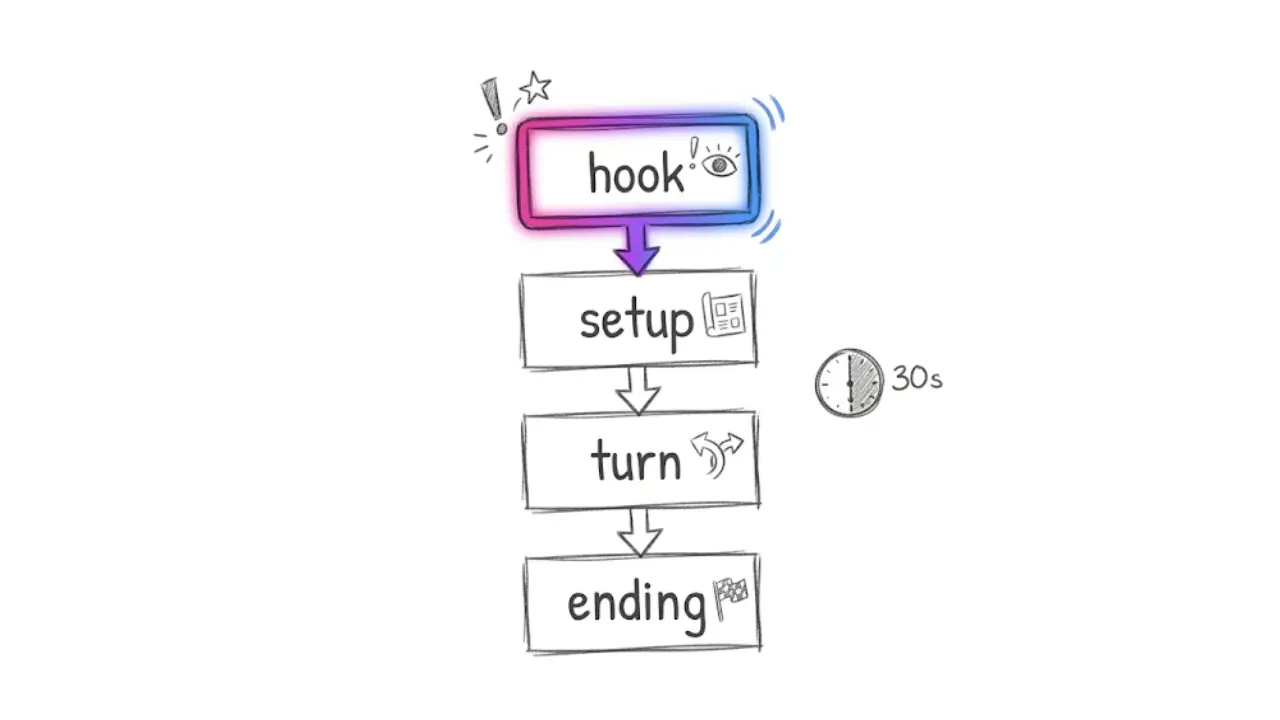
- The POV hook (first line). Start with "POV:" and one concrete situation. Specific beats generic: "POV: you find a door in your basement that was not there yesterday" is better than "POV: something strange happens".
- The setup (2 or 3 short lines). Place the viewer. Use "you", name one sense (a sound, a smell, a color) and keep sentences short.
- The turn. Something changes. A choice, a surprise or a small reveal keeps the viewer watching.
- The ending. Close the loop or leave a question that fits a comment ("Would you open it?").
Write for the ear. Read the script aloud once and cut anything you stumble on. If you want a deeper look at hooks, our guide to writing faceless video scripts that hook in the first three seconds goes line by line.
A few small habits help:
- Keep each line under about ten words so captions stay readable.
- Use present tense. "You step outside" feels closer than "you stepped outside".
- End with a prompt for the comments when it fits the story.
4. How to make a faceless POV video inside Faceless Lab
This is the workflow we use, from idea to a scheduled video. Faceless Lab turns an idea or a script into a finished video with the script, voiceover, visuals, music and captions in one place.
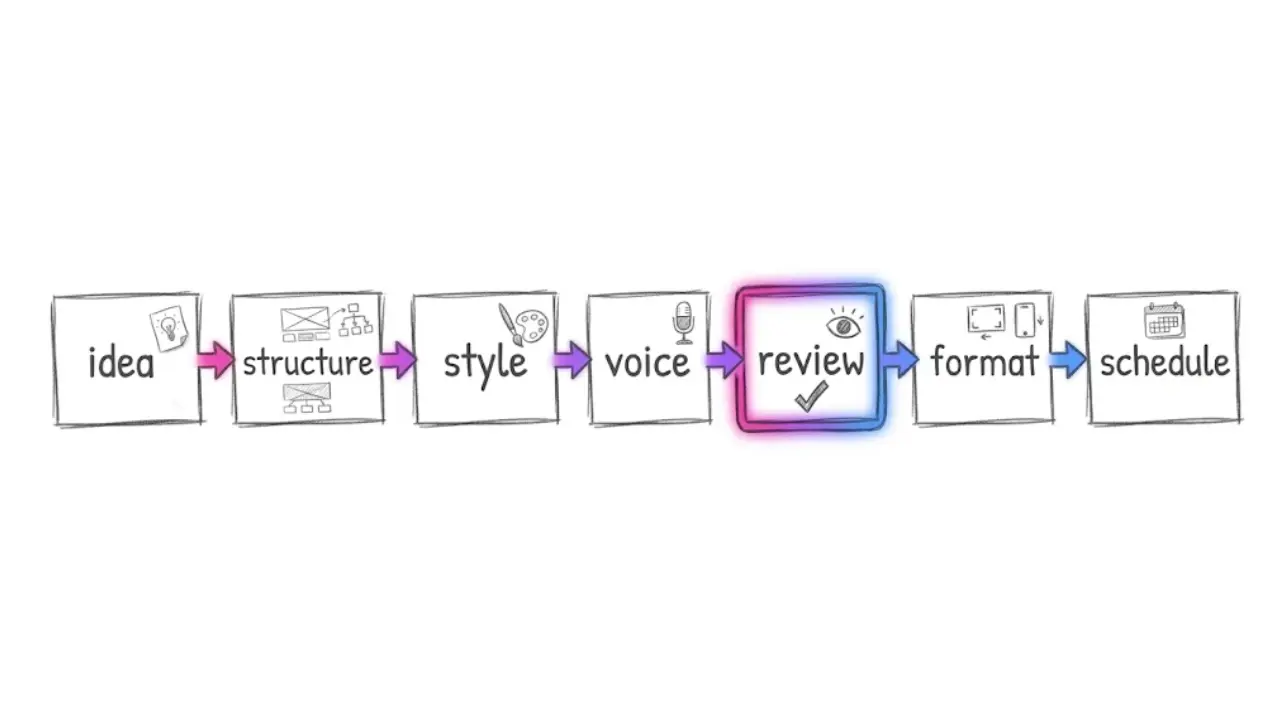
- Start from an idea or a script. Type your POV line ("POV: you are the last passenger on the night train") or paste a script you wrote with the formula above.
- Pick a video structure. Faceless Lab has 8 video structures, and a story or list structure usually suits POV. If you want help choosing, see the 8 faceless video structures.
- Choose a visual style. There are 39 styles, so pick one that matches the mood of the story and keep it for the whole series.
- Choose a voice. Browse 200+ ElevenLabs voices and select one that sounds like the character. Adjust speed and pitch if the pacing needs it.
- Review the draft. Edit any line of the script, swap scenes, change the captions or the music before the final render. This is the step where a good video becomes a great one.
- Pick the format. Choose 9:16 for Shorts, Reels and TikTok, or 16:9 or 1:1 for other placements.
- Schedule it. Set the publishing time and let Faceless Lab post for you. TikTok is the one exception to fully automatic auto-publish, since it needs your explicit consent, so plan a quick manual step there.
Most videos are generated in a few minutes. Once you have a rhythm, batching is the real gain: write ten POV hooks in one sitting, generate them and schedule the week. Our post on batching a month of faceless videos in one afternoon shows how.
💡 Want to try this with your first POV idea? Start free in Faceless Lab. The free trial costs €0 and you do not need to be on camera.
5. Keep your POV visuals and voice consistent
A POV channel gets recognized by feel. Viewers should know it is you from the first second, without a logo.
- One visual style per series. Switching styles every video makes a channel feel random. Pick one of the 39 styles and stay with it for at least a few weeks.
- One voice per character. If your narrator is "the traveler", keep the same voice every time.
- Same caption look. Captions carry the pacing in POV videos, so keep size and position steady.
- A repeatable opening. Starting every video with "POV:" in the same spot builds a habit for returning viewers.
If you want to go deeper, our guides on keeping one visual style and choosing an AI voice cover both decisions in detail. Faceless Lab also works with multiple AI models through Replicate, so you can match the look of a scene to the story you are telling.
6. Where Faceless Lab is and is not the right choice
We built Faceless Lab for creators who want to publish consistently without editing every video by hand, so we will be direct about where it fits.
It is a good fit when:
- You want to turn ideas into finished vertical videos fast and keep a regular schedule.
- You like to review and edit a draft instead of building every scene yourself.
- You plan to run a series and want the same style, voice and structure each time.
It may not be the right choice when:
- You want frame-by-frame control of every cut, like in a traditional video editor.
- Your concept depends on real footage of real people or places.
- You need long cinematic productions rather than short-form videos. The app specializes in 15 to 60 second videos, with longer ones up to five minutes also possible.
Autopilot, our hands-off publishing mode, is still in beta, so we recommend reviewing the first batches yourself before you let it run.
7. What to post once the POV trend cools
POV is a format that outlives any single event, though attention to any format rises and falls. The safest plan is to keep what you built.
- Keep the characters and the style. Move the same narrator into a new format, such as a "what if" video or a short fact.
- Turn your best POV into a series. A numbered series ("POV: day 1 on the night train") gives viewers a reason to come back. See how to run a faceless video series on autopilot.
- Reuse the hook formula. The setup, turn and ending structure works for any short story.
- Watch your numbers. Check which POV situations get the most completed views and make more of those.
Conclusion
Faceless POV videos are a low-friction way to tell stories without a camera. The recipe is simple: a specific "POV:" hook, a short setup, a turn and an ending, with one voice and one visual style repeated until viewers recognize you. If you are still choosing your niche, our Faceless Niche Method guide can save you a few weeks of guessing. Faceless Lab handles the script, voiceover, visuals, music, captions and scheduling, so your time goes into the ideas.
If you make something you like, post it on your own channels. We love seeing what creators build, and if you want to share Faceless Lab with your audience, ask us about the affiliate program.
💡 Ready to make your first one? Try Faceless Lab free and have a finished POV video in minutes.
Try Faceless Lab and make your first faceless video
Read more
Frequently asked questions
What is a faceless POV video?
A faceless POV video is a short vertical video written from the viewer's point of view, usually starting with the word POV and a situation, such as waking up on the first day of winter break. A voiceover and original visuals tell the story, and no presenter appears on camera. The viewer is the main character, so the format feels natural without a face and works on Shorts, Reels, Facebook, LinkedIn and TikTok.
How do I make a POV video without showing my face?
Write a one-line POV hook, add a short setup, a turn and an ending, then pair the script with a voiceover and visuals that do not need a presenter. In Faceless Lab you type the idea or paste the script, choose a structure, a visual style and a voice, review the draft and render. The finished video has captions and music built in, so you never need to record yourself.
How long should a POV video be?
Most POV videos work best between 15 and 45 seconds. That is long enough for a hook, a short setup, a turn and an ending, and short enough that viewers finish it. Faceless Lab specializes in 15 to 60 second videos, with longer videos up to five minutes also possible. Keep lines short, aim for about ten words or fewer per line, and cut anything the story does not need.
What are good POV video ideas for a faceless channel?
Good ideas start with a specific situation the viewer can picture: the first morning at a new job, a night train ride, a door that appears in a basement, or a cat explaining why the couch is hers. You can also frame advice as a scene, such as having a plan for your first week at the gym. Pick one situation, change the setting or ending, and you have a series.
Can I schedule POV videos automatically?
Yes. Faceless Lab can schedule and publish finished videos to your connected platforms, so you can batch a week of POV content in one sitting. Autopilot, our hands-off mode, is still in beta, so review the first batches yourself. TikTok is the exception to fully automatic auto-publish and needs your explicit consent, which means you should plan a short manual step for that platform.
Which AI voice works best for POV videos?
Pick a voice that fits the character telling the story and keep it the same across the series. Faceless Lab offers 200+ ElevenLabs voices, so you can test a few on the same script and choose the one that matches the mood. Warm, close-sounding voices tend to suit second-person stories, and you can adjust speed and pitch if the pacing feels off.
Related articles
Turn a Script You Already Wrote Into a Faceless Video in Minutes
You already have the words. Here is how to turn a finished script into a faceless video with voiceover, visuals, music and captions, and get it scheduled without opening a video editor.
Teach a Language on Shorts and Reels Without Ever Showing Your Face
Language lessons are short, repeatable and built for replays and saves, which makes them a great fit for a faceless channel. Here are the formats, the script rules and a step by step build.
Faceless Shorts Can Have Thumbnails Now. Make Yours Earn the Click
YouTube just gave Partner Program creators custom thumbnails on Shorts. Here is how faceless creators, with no face to feature, build a frame that earns the click and lifts views.