Make Faceless Year-in-Review Videos Before the December Recap Wave
Recap videos flood every feed in December. Here is how to build a faceless year-in-review series with the script, voice and visuals handled for you, and schedule it all before the rush.
Roberto Pasqualini
CMO at Faceless Lab
A faceless year-in-review video is a short recap built from a script, an AI voiceover, stylized visuals, music and captions, with no on-camera presenter. You can make one in Faceless Lab by writing or pasting your recap idea, choosing one of 8 structures and one of 39 visual styles, picking a voice from 200+ ElevenLabs options, reviewing the scenes and rendering in 9:16, 16:9 or 1:1. Recap content spikes every December, so the winning move is to batch five to ten recaps in late November and schedule them through the holidays. Plans start with a €0 free trial, then Starter €19, Growth €59 and Pro €149.
Table of Contents
- Why December belongs to recap videos
- Five year-in-review formats that work without a face
- How to make one inside Faceless Lab, step by step
- Pick the angle that fits your niche
- Schedule the whole run before the rush
- Where Faceless Lab is and isn't the right choice
1. Why December belongs to recap videos
Every year the same thing happens. Music apps, fitness apps and streaming services hand people a summary of their year, and suddenly everyone is in a recap mindset. Viewers search for "year in review" ideas, creators copy the format, and the platforms push recap-style content because people finish it and share it.
For a faceless channel this is a gift, for three reasons.
- The format is built on a list. A recap is "five things that happened" or "ten numbers that defined the year". Lists are the easiest thing to script and the easiest thing to keep on screen with fast visuals.
- The topic is already in the viewer's head. You are not asking anyone to care about something new. You are giving them a short, good version of something they already want.
- Recaps get saved and sent. People forward a recap that matches their year, which helps reach without any extra effort from you.
The catch is timing. If you start on December 28th, your video lands in a feed already full of the same idea. If you start now, you can have a week of recaps scheduled before the crowd arrives. We (Stefano and Roberto) plan our own December calendar in the last week of November for exactly this reason.
2. Five year-in-review formats that work without a face
You do not need footage of yourself or a real "year" to tell. Pick a format and give it a clear promise in the first second.
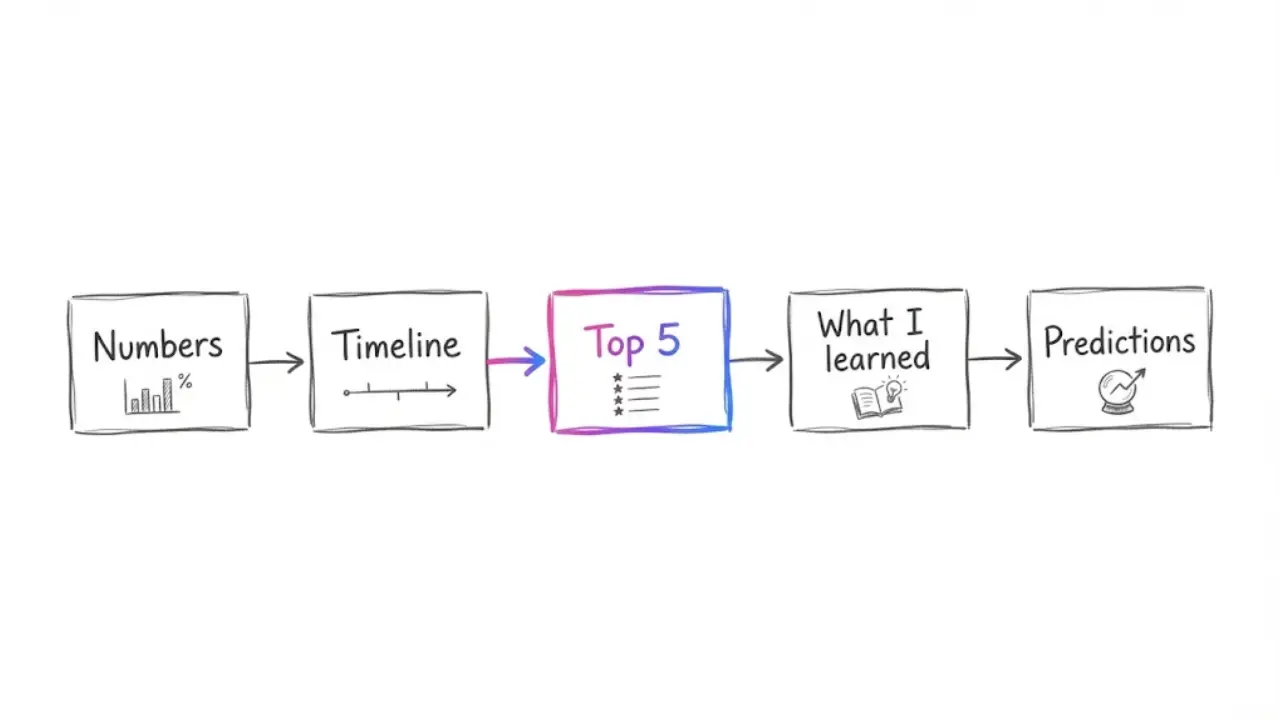
The numbers recap
Five to seven numbers that sum up a year in your niche: prices, records, launches, viewer counts. One number per scene, big on screen, one sentence of voiceover each. This is the simplest format and the one we would start with.
The month-by-month timeline
Twelve short beats, one per month. It works well for news, gaming, sports, tech and entertainment channels, because each month has one clear event to anchor the scene.
The top 5 of the year
Count down from five to one. The countdown gives viewers a reason to stay until the end, which is what the algorithms watch most closely on short-form.
The "what I learned" recap
Good for educational, finance and productivity channels. Five lessons, each with a quick example. This one also converts into evergreen content in January, which we cover below.
The predictions-for-next-year follow-up
Posted in the last days of the year. Same visual style as your recap so the two videos feel like a pair.
Whichever you choose, write the first line as a direct question or a specific claim. "These five numbers changed everything about faceless channels this year" beats "Here is my year in review".
3. How to make one inside Faceless Lab, step by step
This is the exact flow we use. A first draft takes a few minutes, and the rest of your time goes into review.
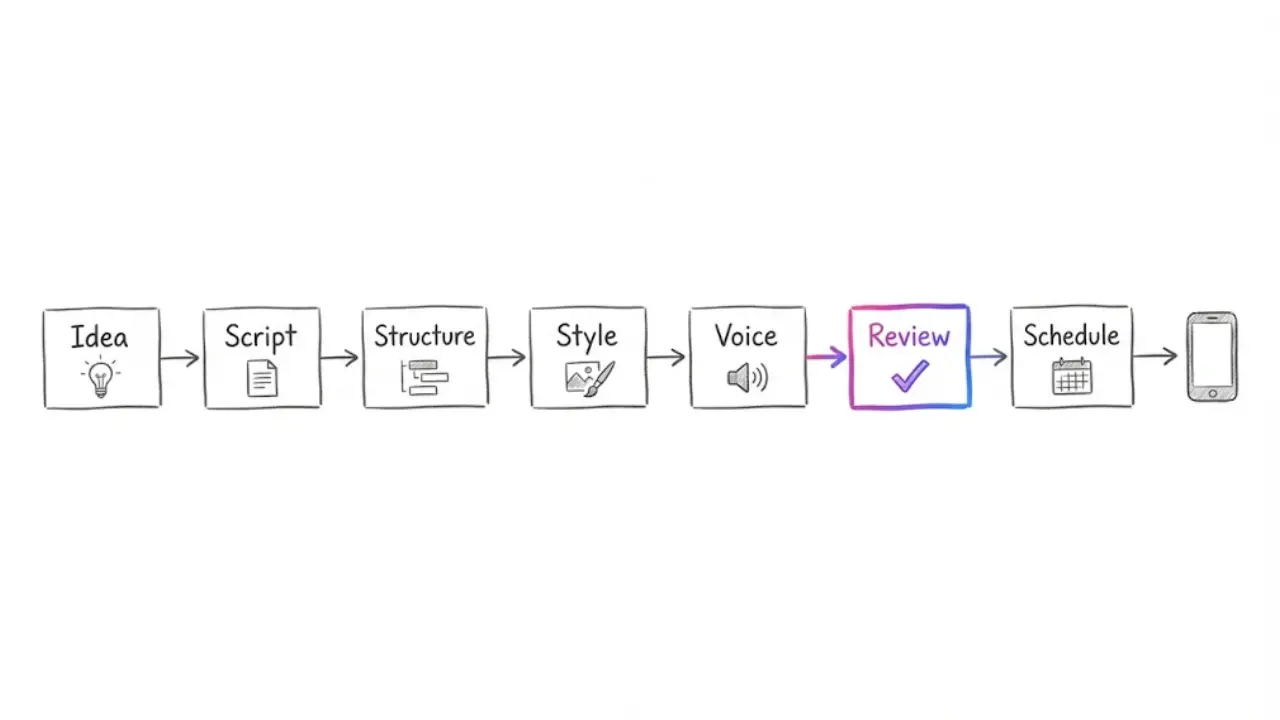
Step 1. Write the idea in one sentence. Paste a topic or a rough prompt such as "five numbers that defined the AI video year". Faceless Lab turns the idea into a full script with scenes, so you start from a draft instead of a blank page.
Step 2. Choose a structure. Faceless Lab offers 8 video structures. For a recap, pick a countdown or list-style structure, since the format is already a sequence of beats.
Step 3. Choose one of the 39 visual styles. Pick one style and keep it across the whole recap series. A consistent look makes the videos feel like one collection, and it helps people recognize your channel in the feed.
Step 4. Pick the voice. You can choose from 200+ ElevenLabs voices and adjust speed and pitch. For recaps a slightly faster, upbeat voice usually works better than a calm narrator.
Step 5. Review before you render. Edit the script, swap any scene visual that does not match, check the captions and choose the background music. Faceless Lab uses multiple AI models through Replicate, so if one scene looks off you can regenerate it.
Step 6. Pick the format. Render in 9:16 for TikTok, Reels and Shorts, 16:9 for YouTube, or 1:1 for feeds that prefer square.
Step 7. Schedule it. Set the publish time and move to the next recap. Most videos finish generating in 2 to 5 minutes, so ten recaps fit in an afternoon.
💡 Want to start from a free account? Try Faceless Lab free and build your first recap today.
4. Pick the angle that fits your niche
A recap only works if it sounds like it belongs to your channel. A few examples of the same format in different niches:
- Gaming: the five biggest launches, patches or surprises of the year.
- Finance: five money lessons, each with one number.
- Sports: the five moments fans will still talk about next season.
- History and facts: five things that were first discovered or invented this year.
- Productivity and study: five habits that stuck and five that did not.
If you are not sure which niche to build a recap channel around, start from the audience, not the format. Ask what people in that niche already want to look back on.
💡 Still deciding what to post and where to start? The Faceless Niche Method is our PDF guide with a Niche Scorecard, a gap-finder and a 30-day validation plan. It is currently on a launch price of $2.79 (normally $49), so check the page for the live price.
5. Schedule the whole run before the rush
This is where faceless channels have the real advantage. Instead of making one recap a day in a panic, you build the whole December calendar in one sitting.
A simple plan:
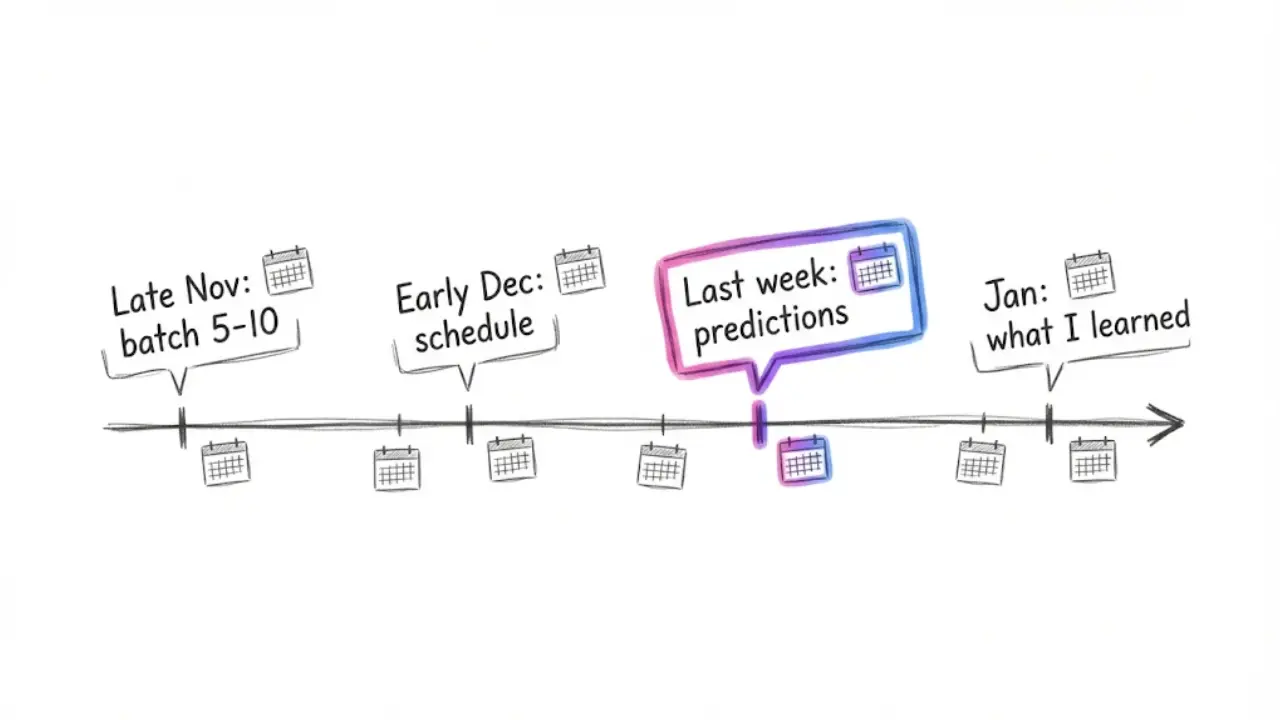
- Late November: make five to ten recap videos in one session.
- Early December: schedule one every one to two days, so the series runs through the holidays.
- Last week of the year: publish the predictions follow-up.
- First week of January: post the "what I learned" version as an evergreen video that is still useful in February.
If you want a full run on its own rhythm, Faceless Lab also has Series, which keeps a set of videos in the same style, and Autopilot, which is in beta. Autopilot can publish automatically, with one exception: TikTok is excluded from fully automatic auto-publish and needs your explicit consent.
When the trend ends, you are not left with dead content. The recap format you built turns into your January review series, and the visual style carries over into whatever you post next.
6. Where Faceless Lab is and isn't the right choice
We would rather you pick the right tool than the one we built, so here is the honest version.
Faceless Lab is a good fit if:
- you want the script, voice, visuals, music and captions in one place;
- you plan to post consistently and want to schedule ahead;
- you value a free trial and simple pricing (Free trial €0, Starter €19, Growth €59, Pro €149) with human support from the people who made it.
It is probably not the right choice if:
- you need frame-by-frame editing control of a long film, where a traditional editor fits better;
- you want a real person or your own footage as the main visual;
- you need a fully automatic TikTok pipeline, since TikTok requires your explicit consent and is not part of fully automatic auto-publish.
For short recap videos and a scheduled December series, we think it is the fastest path from idea to posted. The free trial is the easiest way to check that for yourself.
Conclusion
December is the one month when everybody wants a recap, and a faceless channel can serve that demand without a camera. Pick a format, lock one visual style, batch your recaps in late November and schedule them through the holidays. Then reuse the same format as an evergreen "what I learned" series in January.
If you are still choosing a niche for the channel, our Faceless Niche Method guide is built for that decision.
If you make a recap with Faceless Lab, post it on your own channels and tell people how you made it. Organic reposts are how most small channels grow, and if you like sharing tools you trust, ask us about the affiliate program.
Ready to make yours? Try Faceless Lab free
Read more
Frequently asked questions
Can I make a year-in-review video without showing my face?
Yes. A faceless year-in-review video uses an AI voiceover, stylized visuals, background music and captions instead of an on-camera presenter. In Faceless Lab you describe the recap in a sentence, get a full script with scenes, choose a visual style and a voice, review the result and render it. Most videos finish generating in about 2 to 5 minutes. You can post the same recap on TikTok, Instagram Reels and YouTube Shorts using the 9:16 format, or use 16:9 for standard YouTube.
When should I post year-in-review videos?
Plan them in late November and publish through December, with the strongest push in the last two weeks of the month, when people are already in a recap mindset. Posting too late puts you in a feed full of the same idea. A practical schedule is one recap every one to two days from early December, a predictions video in the final days of the year, and a "what I learned" version in early January.
How long should a faceless recap video be?
Short-form recaps work best between 15 and 60 seconds, which is the range Faceless Lab focuses on. That is enough for five to seven beats with one sentence each. If your topic needs more room, such as a month-by-month timeline, you can go longer, and Faceless Lab supports videos up to 5 minutes. Keep the first line specific and use a countdown so viewers have a reason to reach the last scene.
What is the best format for a year-in-review video?
Start with a numbers recap or a top-five countdown. Both are built on lists, which are easy to script and keep on screen with fast visuals. A month-by-month timeline suits news, gaming and sports channels, while a "what I learned" recap suits educational and finance channels. Pick one format, give it a clear promise in the first second and keep one visual style across the whole series so it feels like a collection.
How much does it cost to make faceless recap videos with Faceless Lab?
Faceless Lab has a free trial at €0, then three paid plans: Starter at €19, Growth at €59 and Pro at €149. You can test a recap on the free trial before choosing a plan. Check the live pricing page for what each plan includes, because limits can change. Human support comes from the co-founders, Stefano and Roberto, so if you get stuck on your first recap you can ask us directly.
Can I schedule my recap videos to post automatically?
Yes, you can schedule and publish from Faceless Lab so a whole December series goes out on time. Series keeps videos in the same style, and Autopilot, currently in beta, can publish automatically. TikTok is the exception: it is excluded from fully automatic auto-publish and needs your explicit consent. For TikTok, plan to confirm each post yourself, and use automation for the other platforms.
Related articles
Make Faceless Skeleton Shorts That Teach Anatomy in 30 Seconds
Skeleton shorts turn body facts into quick, rewatchable videos with no host on screen. Here is how to script, make and schedule a faceless skeleton channel, and keep it going after the trend cools.
Cyber Monday Lands on November 30. Get Your Faceless Deal Videos Scheduled First
Cyber Monday is under three weeks away. Learn which deal video formats get saved, how to write honest picks with AI voice and visuals, and how to schedule the whole run before November 30.
Make AI Fruit Drama Videos That Keep People Watching Episode After Episode
Talking-fruit soap operas took over short-form feeds. Here is how to make your own faceless fruit drama series, from the story format to the script, the voices and the posting plan.