Start a Faceless Tech Tips Channel With Shorts That Teach One Trick at a Time
Phone tricks, shortcuts and AI prompts make great short videos, and none of them need your face. Here is how to pick an angle, lock a format and publish tech tips on a schedule.

Stefano Ventrudo
CTO at Faceless Lab
How to choose a tech tips angle, lock a repeatable format and let each short script, voice, edit and publish itself.
Can you run a faceless tech tips channel without ever filming yourself or your screen? Yes, and more creators are doing it than you would guess. People search for phone tricks, keyboard shortcuts and AI prompts every single day, and most of those answers fit in 30 to 45 seconds. We (Stefano and Roberto) run faceless channels ourselves, and tech tips are one of the easiest formats to keep alive, because the topic supply never dries up and each video teaches exactly one thing.
Executive Summary. A faceless tech tips channel publishes short videos that each teach one useful trick, such as a phone setting, a shortcut or an AI prompt, using a voiceover, AI-generated visuals and captions instead of a face on camera. The channels that grow pick one narrow angle, reuse one format and publish on a steady rhythm. Inside Faceless Lab you choose one of 8 structures and one of 39 visual styles, pick a voice from more than 200 ElevenLabs options, and use Series and Autopilot (beta) to publish to YouTube, Instagram, Facebook and LinkedIn automatically. TikTok stays manual because it needs your explicit consent. You can start on the free trial at €0 and move to Starter (€19), Growth (€59) or Pro (€149) as your output grows.
Table of Contents
- Why tech tips fit a faceless channel
- Pick a tech tips angle people actually search for
- Turn one trick into a repeatable format
- How to make a tech tips video inside Faceless Lab
- Keep every tip accurate and follow the platform rules
- Where Faceless Lab is the right choice, and where it isn't
- A seven-day tech tips plan you can copy
1. Why tech tips fit a faceless channel
Tech tips work without a face because the value sits entirely in the trick. Nobody saves a "hide your battery percentage" video because of who said it. They save it because it solved something in ten seconds.
Here is why the format suits a faceless setup:
- One idea per video. A tip is small enough to script in four or five lines, which keeps production fast and the pacing tight.
- Endless topic supply. Every new phone update, app change and AI tool release creates a fresh batch of tips. You will not run out.
- High save and share rate. People bookmark a tip to use later and send it to a friend who is struggling with the same setting. That behavior tells the algorithm the video is useful.
- Easy to keep evergreen. A trick for organizing files or writing a better prompt stays useful long after the day you post it.
We have seen the same pattern across the niches we cover, from faceless educational videos to life hacks. Short, single-purpose and useful beats long and clever.
2. Pick a tech tips angle people actually search for
"Tech tips" on its own is too wide. A channel that covers phones, laptops, smart homes and AI tools all at once has no clear promise, so nobody knows why to follow it. Narrow first, then widen later.
Angles that give a channel a clear identity:
- Phone tricks. Hidden settings, camera tips and battery habits for iPhone or Android.
- Shortcuts and productivity. Keyboard shortcuts, spreadsheet formulas and note-taking setups.
- AI tools and prompts. One prompt, one use case, one result per video.
- Privacy and security basics. Simple habits like turning on two-step login or cleaning up app permissions.
- Smart home and gadget tips. Getting more out of devices people already own.
Test the angle before you commit. Type a few topics into YouTube and TikTok search and watch the autocomplete suggestions. If people are already asking the question, the demand exists. Then write 20 tip ideas in five minutes. If you stall at eight, the angle is too narrow. If the list keeps flowing, you have a channel.
💡 Still deciding which niche deserves your next six months? Our guide The Faceless Niche Method walks through three ways to choose a niche, a scorecard and a 30-day validation plan, so you pick with evidence in hand.
3. Turn one trick into a repeatable format
A channel feels professional when every video follows the same shape. Once you lock the shape, making a new tip becomes a topic swap.
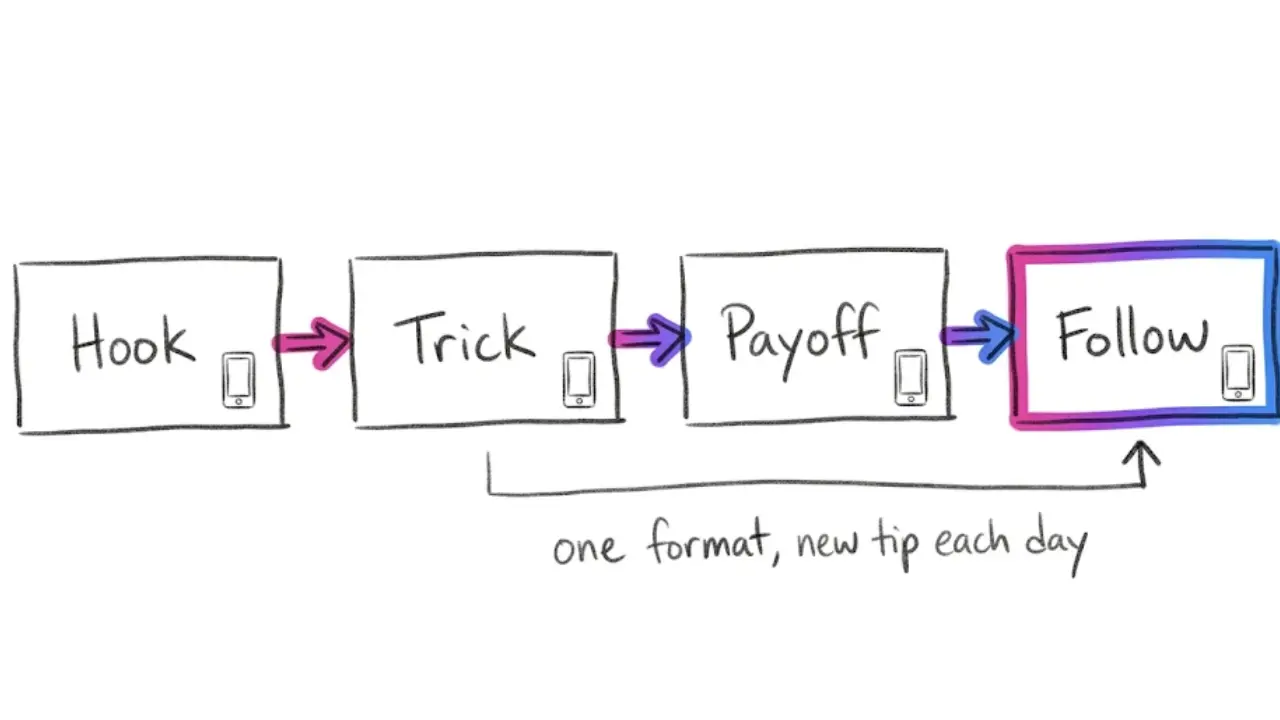
A simple tech tips shape that works across angles:
- Hook (first 2 seconds). Name the problem. "Your phone is draining faster than it should."
- The trick (10 to 25 seconds). Say exactly what to tap, type or change, in the order someone would do it.
- The payoff (3 to 5 seconds). State what they get. "That saves you about ten minutes a week."
- The nudge. Invite a save or a follow for the next tip.
Faceless Lab ships with 8 built-in structures, so you are not designing this skeleton from scratch. Pick the one that matches your pattern and it applies to every episode. Then lock three variables and leave them alone:
- Length. Hold one target, for example 30 to 45 seconds.
- Voice. Choose one voice from the 200-plus ElevenLabs options and stay with it. A familiar voice becomes part of your channel identity.
- Visual style. Pick one of the 39 styles so your feed looks like one channel and not a random collage.
4. How to make a tech tips video inside Faceless Lab
Here is the path from a blank idea to a finished tip. It takes minutes once your format is set.
- Open the dashboard. Start on the free trial. No credit card is needed, so you can build a few tips before paying anything.
- Type your tip or paste a script. Something like "three iPhone settings that save battery" is enough to start. You can also paste your own script if you already wrote one.
- Choose your structure. Pick one of the 8 structures that fits a quick tip.
- Pick your visual style and voice. Choose one of the 39 styles and a voice from the 200-plus ElevenLabs library. Keep both the same for the whole channel.
- Generate and review. The app writes the script with scenes, records the voiceover, builds the visuals with its multi-model Replicate setup, then adds captions and background music. Read the draft, fix any wording, and check that every step is correct.
- Choose your format. Export in 9:16 for Shorts, Reels and TikTok, or 16:9 and 1:1 when a platform calls for it.
- Schedule and publish. Connect your platforms and set a cadence. Approved videos go out to YouTube, Instagram, Facebook and LinkedIn without you opening the app each day.
Most videos finish generating in a few minutes, so a full week of tips can come out of one sitting.
💡 Ready to make your first tip? Create a free account and open the dashboard and build one while you read.
5. Keep every tip accurate and follow the platform rules
Tech tips live or die on trust. One wrong menu path and viewers stop believing the channel. A few habits protect you.
Verify every step yourself. Before you approve a draft, run the trick on a real device or app. Menus move between versions, and a tip that worked last year may have changed. Add the version or device name in the voiceover when it matters, such as "on iPhone" or "in the latest Android."
Do not impersonate brands. Talk about products by name and describe what they do, but skip copying a company's logos, ads or official footage, and never present your channel as an official source for a brand.
Be honest about AI visuals. Faceless videos use AI-generated imagery, and platforms keep updating their rules on AI labels. Check the current labeling and disclosure options on each platform you post to, and use them when they apply.
Skip risky claims. Avoid promising security guarantees or recovery of lost data. Stick to simple, safe habits and point people to official support pages for anything serious.
6. Where Faceless Lab is the right choice, and where it isn't
We would rather you pick the right tool than any tool, so here is the honest read.
Faceless Lab is a strong fit when:
- You post short tips on a rhythm. The app is built around 15 to 60 second videos, with longer videos up to about five minutes also possible.
- Consistency is your bottleneck. If you know plenty of tricks but keep skipping days, Series plus Autopilot (beta) solves that exact problem.
- You want one workflow for everything. Script, voiceover, visuals, music, captions and scheduling all live in one place.
- You want to start cheap. The free trial is €0, and the paid plans are Starter €19, Growth €59 and Pro €149.
It is a weaker fit when:
- Viewers need to see the exact clicks. Faceless Lab builds videos from a script, voiceover, AI visuals, captions and music. It is not a screen recorder. For detailed software walkthroughs, record your screen separately.
- Your channel needs your face or live reactions. Faceless is the whole point of the app.
- You want TikTok to publish fully on its own. TikTok is excluded from fully automatic auto-publish by design because it needs your explicit consent, so you confirm those posts by hand.
If your tips are quick and conceptual, such as settings, habits, prompts and shortcuts explained in plain language, the fit is good. If every video needs a screen capture, use a recorder for the visuals and keep Faceless Lab for the faster formats.
7. A seven-day tech tips plan you can copy
Here is a plan you can run this week.
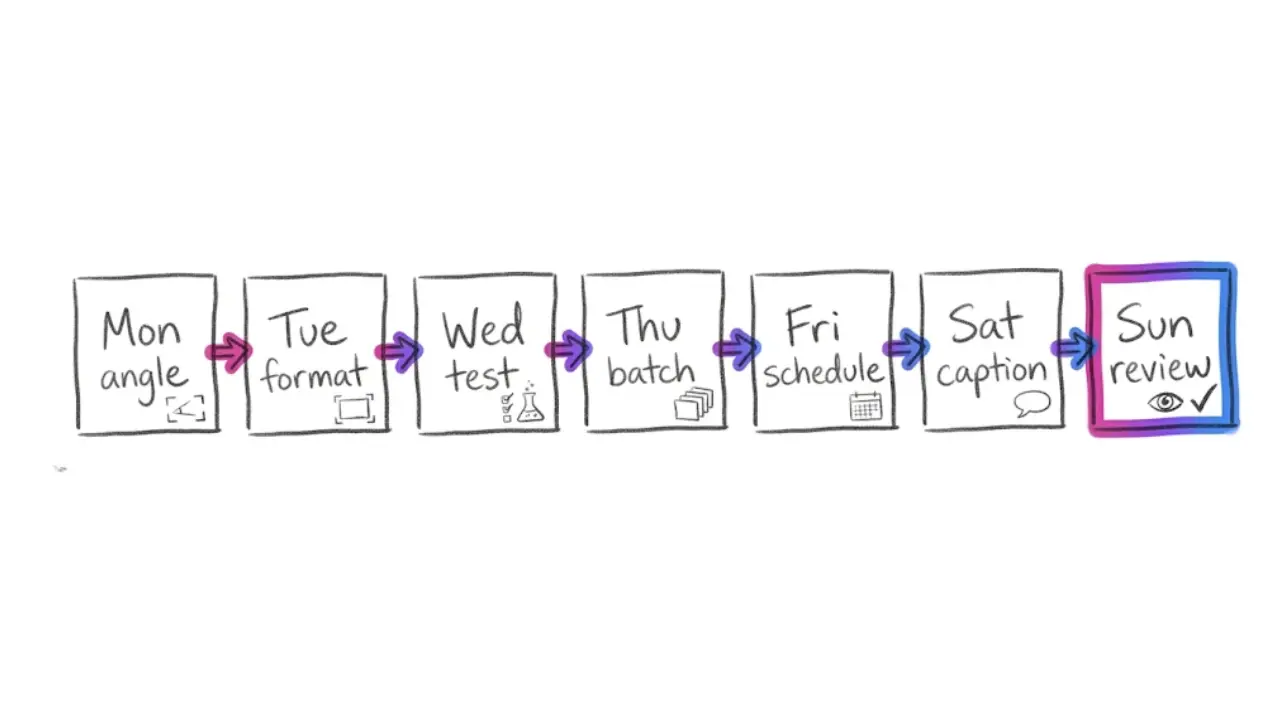
- Day 1, pick the angle. Choose one angle from section 2 and write 20 tip ideas.
- Day 2, lock the format. Choose one structure, one style, one voice and one length. Write them down so you never re-decide.
- Day 3, test and verify. Run each tip yourself on a real device and note anything that needs a version label.
- Day 4, generate a batch. Produce your first 7 to 10 videos, review each one and approve.
- Day 5, connect and schedule. Link YouTube, Instagram, Facebook and LinkedIn, then set a daily cadence. Queue TikTok posts for manual confirmation.
- Day 6, add a second layer. Write a short pinned comment or caption for each video that names the device or version.
- Day 7, read the numbers. See which tips got saved and rewatched, and let those winners shape next week's list.
The verdict. A faceless tech tips channel is one of the lowest-effort ways to build a steady short-form presence, because each video teaches one thing and the topic supply never ends. Pick a narrow angle, lock one format, check every step for accuracy and let the app carry the production and publishing. You can build your first week of tips on the free trial and upgrade only when the channel earns it.
If you are still choosing between niches, take a look at our guide The Faceless Niche Method, which is on a launch price right now, so check the page for the current offer.
If this helped, repost it to a friend who always knows the best phone trick, and if you want to earn while you share, our affiliate program pays you for the people you send our way.
Build your first faceless tech tip today: try Faceless Lab free.
Read more
Frequently asked questions
Can you run a tech tips channel without showing your face?
Yes. A tech tips video teaches one trick, so the value is in the instructions, not in the person delivering them. You can use a voiceover, AI-generated visuals and on-screen captions to explain a phone setting, a shortcut or an AI prompt clearly. Faceless Lab builds that package from a script or a simple idea, including voice, visuals, music and captions. The one limit is detailed software walkthroughs where viewers must see every click, which call for a separate screen recording.
What tech tips topics work best for short videos?
Topics that solve a small problem in under 45 seconds work best. Good examples are hidden phone settings, battery habits, keyboard and spreadsheet shortcuts, AI prompts with a clear result, and basic privacy habits like turning on two-step login. Each of these has deep topic supply and a high save rate, since viewers bookmark them to use later. Pick one narrow angle first, such as phone tricks or AI prompts, so your channel has a clear promise before you widen into other areas.
How long should a tech tip video be?
Most tech tips fit comfortably in 30 to 45 seconds. That gives you two seconds for the hook, 10 to 25 seconds for the trick itself and a few seconds for the payoff. Faceless Lab supports short-form videos of 15 to 60 seconds, with longer videos up to about five minutes available when a topic needs more room. Pick one target length for your channel and stay close to it, so your feed feels consistent and viewers know what to expect.
How do I keep tech tips accurate?
Run every trick on a real device or app before you approve a video. Menus and settings change between versions, so a tip that worked last year may be outdated. Name the device or version in the voiceover when it matters, for example iPhone or the latest Android. Avoid promising security guarantees or data recovery, and point viewers to official support pages for anything serious. Accuracy builds trust, and trust is what turns a viewer into a follower.
Can I auto-publish tech tips to YouTube, Instagram and TikTok?
Partly. With Autopilot, currently in beta, Faceless Lab can generate and queue videos on your schedule and publish approved ones automatically to YouTube, Instagram, Facebook and LinkedIn once connected. TikTok is excluded from fully automatic auto-publish by design, because it needs your explicit consent to post. You still make TikTok versions in the same workflow and confirm each post yourself. Reviewing your queue a couple of times a week keeps a weak draft from going live.
How much does it cost to start a faceless tech tips channel?
You can start for free. Faceless Lab offers a free trial at €0 with no credit card needed, which is enough to build and test your first tips. Paid plans are Starter at €19, Growth at €59 and Pro at €149, with higher limits as you move up. Most creators begin on the free trial, confirm the workflow fits their angle, then upgrade once the channel is posting steadily and the output justifies a plan.
Related articles
Turn Company Stories Into Faceless Business Documentary Videos
Company stories already have a plot. Learn how to research one, script it and turn it into a faceless business documentary video with AI voice and visuals.
Earn From TikTok Creator Rewards With a Faceless Account, Step by Step
Creator Rewards pays for original videos over a minute from accounts with 10,000 followers. Here is how a faceless TikTok account can build toward it, with a 30-day plan and honest limits.
9:16, 16:9 or 1:1? Pick the Right Frame for Every Faceless Video Before You Make It
Which frame should your faceless videos use? A clear guide to 9:16, 16:9 and 1:1 for Shorts, Reels, TikTok, Facebook and LinkedIn, plus how to set it up.